
Work Order Panel and Document Configuration
Before adding components to a work order, we need to define what panels are in there. This is done by going to the Panel and Document Configuration from the work order context menu.
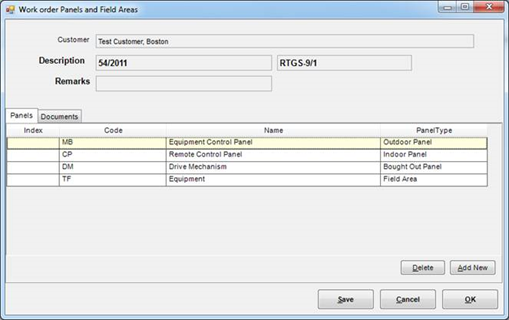
| Name | Description |
|---|---|
| Index | Used to control order of Panels appearing in work order schematic |
| Code | This is stored with the control items. If you want to change panel name later, it is OK but code should normally not be changed once components have been added. |
| Name | Name of the panel – appears on all reports and screens |
| PanelType | **-->**Indoor Panel and Outdoor panel are same except that the mounting codes are chosen based on them **-->**Bought Out Panel lets you add only a terminal block – we are interested in generating only the inter connections **-->**Field Area – Devices Out there in the field which are wired up to the panel. Adding a “panel” for them here helps in grouping them and also helps in generating correct interconnection cables. |